
ViewCommander-NVR Evaluation Installation Instructions
STEP 1:
- NOTE: If you have a valid ViewCommander License, do not download the software from this page. Instead, use the download link that came with the software. if you do not have this link, please use the support form.
- DO NOT install this evaluation on the same computer if you have a licensed copy, as it will update the video and configuration files to a newer format that will not be compatible with older versions.
STEP 2:
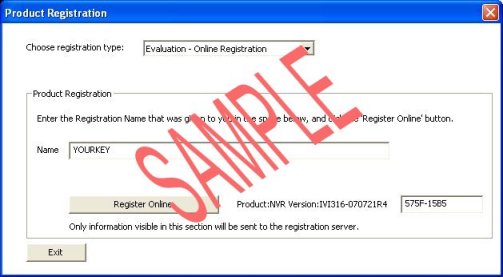
- When you run the ViewCommander-NVR program for the first time, you will see the following screen on your computer:
STEP 3:
- Select “Evaluation-Online Registration” from the pull-down menu.
STEP 4:
- Enter the registration name (usually your email address) that was given to you in the “Name” section (the registration name “YOURKEY” is seen in the example above).
- You must use the registration key that was given to you before you can register the software. This name was included in the email that you received.
STEP 5:
- Click the “Register Online” button.
- If your computer does not have an online connection, or the online registration process fails, please email us the 8-digit hardware fingerprint on the registration screen and we will email you an evaluation key to manually enter (the hardware fingerprint in the above example is “575F-15B5”. It will be different on your system)
The ViewCommander-NVR evaluation has the following limitations:
- It will allow up to 4 cameras to be active and recording simultaneously
- It will run for 21 days after registering
- It will have an evaluation message in the live video
- It will have an evaluation message flash periodically in the web interface
NOTE: The purchased version doesn’t require online activation (only the evaluation does). Once purchased, you will receive a USB key and be able to re-install and/or move the software to another computer without the need to activate the software online or contact us.
ViewCommander-NVR user Guide: CLICK HERE
For support with the evaluation, please Contact Us or use the Online Support Form.